
Processing – Validation
The Validation tab controls validation rules applied during transaction processing. These settings influence how payment data is checked, validated, and accepted for different payment methods, channels, and transaction sources.
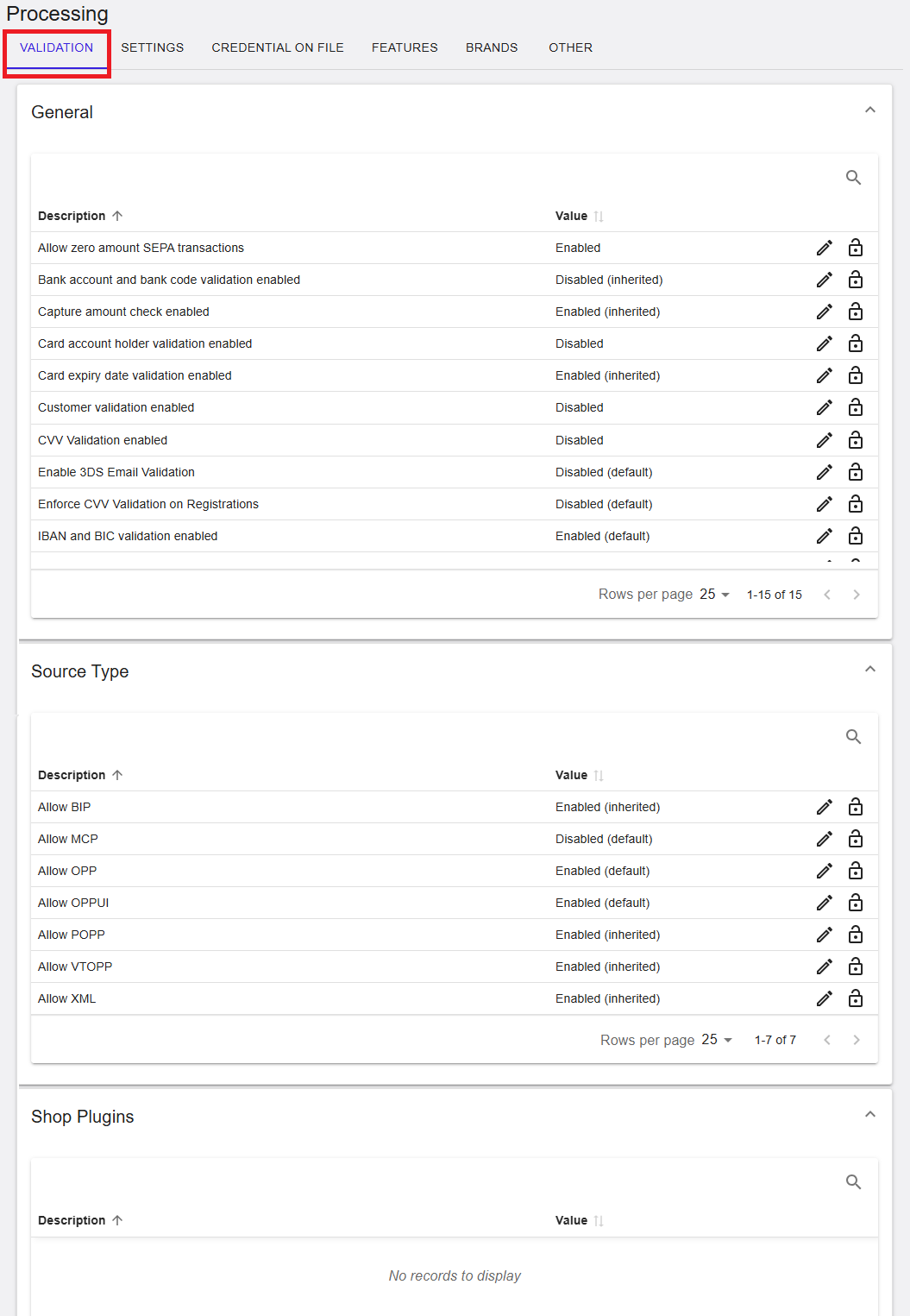
Figure 1: Processing – Validation tab
Where to find this screen
- In the left navigation menu, select Admin.
- Select Processing.
- Select the VALIDATION tab.
Validation Sections (Expandable Panels)
The VALIDATION tab is organized into expandable sections. Each section groups validation rules by functional area. Select the arrow on the right side of a section to expand or collapse it.
Sections shown include:
- General
- Source Type
- Shop Plugins
General
The General section contains validation rules that apply to card, bank transfer, and account-based payment methods. These settings help ensure transaction data integrity and compliance.
- Allow zero amount SEPA transactions – Allows SEPA transactions with a zero amount.
- Capture amount check enabled – Ensures captured amounts are validated.
- Card account holder validation enabled – Validates the cardholder name.
- Card expiry date validation enabled – Ensures the card expiry date is valid.
- CVV validation enabled – Controls validation of the card verification value.
- IBAN and BIC validation enabled – Enables validation for bank account identifiers.
- Enable 3DS Email Validation – Controls email validation during 3D Secure flows.
Each rule displays its current value (for example, Enabled, Disabled, or Inherited) and may provide edit or lock icons depending on permissions.
General Validation Rules (RiRo Settings)
The following table describes the rule-based (RiRo) validation settings available in the General section, including their purpose and possible values.
| Name | Description | Value |
|---|---|---|
| Allow zero amount SEPA transactions | Controls whether SEPA transactions with a zero amount value are permitted. | Enabled / Disabled / Inherited |
| Bank account and bank code validation enabled | Controls validation of bank account number and bank code before processing. | Enabled / Disabled / Inherited |
| Capture amount check enabled | Validates capture amounts against the original pre-authorisation amount. | Enabled / Disabled / Inherited |
| Card account holder validation enabled | Validates the cardholder name provided in the transaction request. | Enabled / Disabled / Inherited |
| Card expiry date validation enabled | Rejects transactions submitted with an expired card. | Enabled / Disabled / Inherited |
| Customer validation enabled | Controls validation of customer data provided in the request. | Enabled / Disabled / Inherited |
| CVV Validation enabled | Validates the CVV value provided in the transaction request. | Enabled / Disabled / Inherited |
| Enable 3DS Email Validation | Validates the email address during 3D Secure authentication. | Enabled / Disabled / Inherited |
| Enforce CVV Validation on Registrations | Enforces CVV validation during payment registration (tokenisation) flows. | Enabled / Disabled / Inherited |
| IBAN and BIC validation enabled | Validates IBAN and BIC values against formatting rules. | Enabled / Disabled / Inherited |
| Refund amount check enabled | Validates refund amounts against the original transaction amount. | Enabled / Disabled / Inherited |
| Reject transactions with missing tax number | Rejects transactions submitted without a tax number. | Enabled / Disabled / Inherited |
| Reversal amount check enabled | Validates reversal amounts against the original transaction amount. | Enabled / Disabled / Inherited |
| Risk based Capture validation for Pre-Authorizations enabled | Applies risk-based validation rules during capture of pre-authorisations. | Enabled / Disabled / Inherited |
| Tax number validation enabled | Validates the tax number for correctness and format. | Enabled / Disabled / Inherited |
Source Type
The Source Type section controls which transaction sources and integration types are allowed. This is commonly used to restrict or enable specific APIs or payment channels.
- Allow BIP – Enables Browser Integration Platform transactions.
- Allow MCP – Controls Merchant Control Panel transactions.
- Allow OPP – Enables Open Payment Platform API transactions.
- Allow OPPUI – Enables Open Payment Platform UI transactions.
- Allow POPP – Enables POPP-based integrations.
- Allow VTOPP – Enables Virtual Terminal OPP transactions.
- Allow XML – Enables XML-based integrations.
Source Type Validation Rules
| Name | Description | Value |
|---|---|---|
| Allow BIP | Permits transactions submitted via the BIP source type. | Enabled / Disabled / Inherited |
| Allow MCP | Permits transactions submitted via the MCP source type. | Enabled / Disabled / Inherited |
| Allow OPP | Permits transactions submitted via the OPP REST API. | Enabled / Disabled / Inherited |
| Allow OPPUI | Permits transactions initiated via the OPP user interface. | Enabled / Disabled / Inherited |
| Allow POPP | Permits transactions submitted via the POPP integration. | Enabled / Disabled / Inherited |
| Allow VTOPP | Permits transactions initiated via the virtual terminal. | Enabled / Disabled / Inherited |
| Allow XML | Permits transactions submitted via the XML API. | Enabled / Disabled / Inherited |
Shop Plugins
The Shop Plugins section is used to control validation behavior specific to shop plugin integrations.
If no records are displayed, this indicates that no shop plugin-specific validation rules are configured for the selected scope.
Search and Actions
- The Search icon allows filtering validation rules.
- The Edit icon allows updating a rule, subject to permissions.
- The Lock icon indicates a read-only rule.
Summary
The Processing → Validation tab provides control over rule-based validation settings applied during transaction processing. These settings help ensure correctness, compliance, and consistency across payment methods and integration types. Availability of settings and edit actions depends on the selected hierarchy level and assigned user permissions.