
Processing – Settings
The Settings tab contains general processing configuration that affects how transactions are handled, identified, referenced, and validated across different payment scenarios. These settings apply at the selected hierarchy level and may be inherited or restricted depending on scope.
Figure 1: Processing – Settings tab
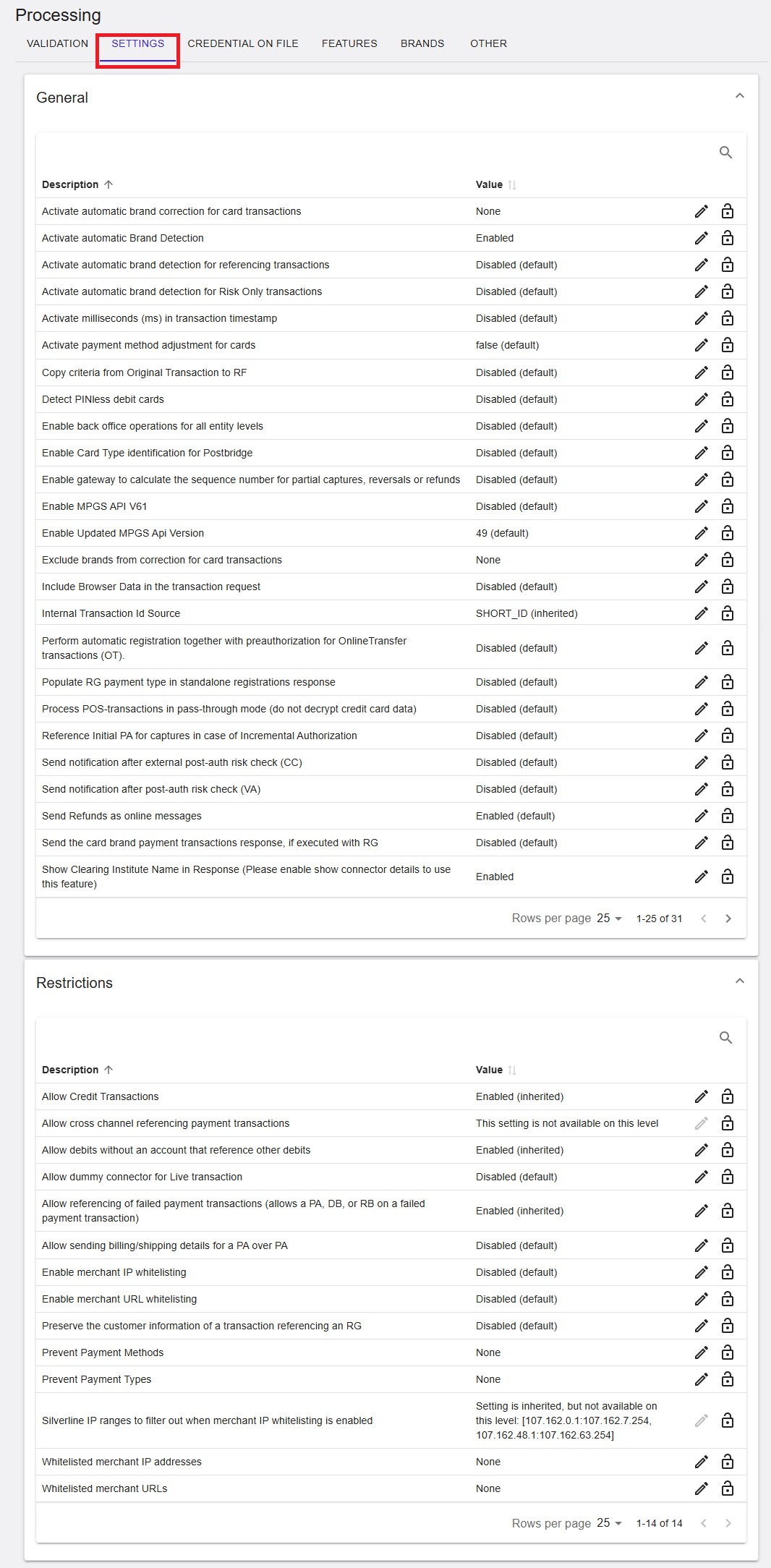
Where to find this screen
- In the left navigation menu, select Admin.
- Select Processing.
- Select the SETTINGS tab.
Settings Sections (Expandable Panels)
The SETTINGS tab is organized into expandable sections. Each section groups related processing settings and can be expanded or collapsed using the arrow on the right.
Sections shown include:
- General
- Restrictions
General
The General section contains core processing behavior settings. These settings influence brand detection, transaction referencing, risk handling, and response content.
Examples of settings in this section:
- Activate automatic Brand Detection – Enables automatic detection of card brands.
- Activate automatic brand correction for card transactions – Controls correction of detected card brands.
- Activate payment method adjustment for cards – Adjusts payment method handling for card transactions.
- Detect PINless debit cards – Enables identification of PINless debit cards.
- Enable MPGS API V61 / Updated MPGS API Version – Controls MPGS API version usage.
- Include Browser Data in the transaction request – Adds browser data to transaction requests where applicable.
- Send Refunds as online messages – Controls how refunds are transmitted.
- Show Clearing Institute Name in Response – Includes clearing institute information in responses.
Each setting displays its current value (for example, Enabled, Disabled (default), or Inherited) and may provide edit or lock icons depending on permissions.
General Processing Settings (RiRo)
The following table describes the rule‑based (RiRo) processing settings available in the General section, including their purpose and possible values.
| Name | Description | Value |
|---|---|---|
| Activate automatic brand correction for card transactions | Automatically corrects the card brand when a more accurate brand is identified during processing. | Enabled / Disabled / Inherited |
| Activate automatic Brand Detection | Automatically detects the card brand based on the card number, overriding the submitted brand. | Enabled / Disabled / Inherited |
| Activate automatic brand detection for referencing transactions | Applies automatic brand detection to referencing transactions such as captures, refunds, and reversals. | Enabled / Disabled / Inherited |
| Activate automatic brand detection for Risk Only transactions | Applies brand detection to Risk Only transactions without full payment processing. | Enabled / Disabled / Inherited |
| Activate milliseconds (ms) in transaction timestamp | Includes millisecond precision in transaction timestamps returned in responses. | Enabled / Disabled / Inherited |
| Activate payment method adjustment for cards | Allows the platform to adjust the payment method based on BIN or brand detection. | Enabled / Disabled / Inherited |
| Copy criteria from Original Transaction to RF | Copies routing and dispatching criteria from the original transaction to referencing transactions. | Enabled / Disabled / Inherited |
| Detect PINless debit cards | Detects PINless debit cards to enable differentiated processing behavior. | Enabled / Disabled / Inherited |
| Enable back office operations for all entity levels | Allows back office operations across all hierarchy levels. | Enabled / Disabled / Inherited |
| Enable Card Type identification for Postbridge | Enables card type identification for Postbridge‑processed transactions. | Enabled / Disabled / Inherited |
| Enable gateway to calculate sequence number for partial operations | Automatically calculates sequence numbers for partial captures, reversals, and refunds. | Enabled / Disabled / Inherited |
| Enable MPGS API V61 | Enables MPGS API version 61 for transaction processing. | Enabled / Disabled / Inherited |
| Enable Updated MPGS API Version | Specifies the target MPGS API version used for processing. | Enabled / Disabled / Inherited |
| Exclude brands from correction for card transactions | Defines card brands that are excluded from automatic brand correction. | Configured list |
| Include Browser Data in the transaction request | Includes browser data in requests, typically for 3DS and fraud use cases. | Enabled / Disabled / Inherited |
| Internal Transaction Id Source | Defines which identifier is used as the internal transaction reference. | Configured value |
| Perform automatic registration together with preauthorization for OT | Automatically registers payment instruments during OnlineTransfer preauthorizations. | Enabled / Disabled / Inherited |
| Populate RG payment type in standalone registrations response | Populates the payment type as RG in standalone registration responses. | Enabled / Disabled / Inherited |
| Process POS-transactions in pass-through mode | Processes POS transactions without decrypting card data. | Enabled / Disabled / Inherited |
| Reference Initial PA for captures in Incremental Authorization | References the initial preauthorization when capturing incremental authorizations. | Enabled / Disabled / Inherited |
| Send notification after external post-auth risk check (CC) | Sends a webhook notification after an external post‑authorization risk check. | Enabled / Disabled / Inherited |
| Send notification after post-auth risk check (VA) | Sends a webhook notification after a post‑authorization risk check for VA transactions. | Enabled / Disabled / Inherited |
| Send Refunds as online messages | Sends refunds to connectors as online, real‑time messages. | Enabled / Disabled / Inherited |
| Send card brand payment transactions response when executed with RG | Includes the card brand payment response when executed using a registration. | Enabled / Disabled / Inherited |
| Show Clearing Institute Name in Response | Includes clearing institute information in processing responses. | Enabled / Disabled / Inherited |
Restrictions
The Restrictions section controls which transaction types, payment methods, and operational behaviors are allowed.
Restrictions (RiRo)
| Name | Description | Value |
|---|---|---|
| Allow Credit Transactions | Controls whether credit transactions are permitted. | Enabled / Disabled / Inherited |
| Allow cross channel referencing payment transactions | Allows referencing transactions across different channels. | Enabled / Disabled / Inherited |
| Allow debits without an account that reference other debits | Allows debits without account data to reference other debit transactions. | Enabled / Disabled / Inherited |
| Allow dummy connector for Live transaction | Allows use of the dummy connector for live transactions. | Enabled / Disabled / Inherited |
| Allow referencing of failed payment transactions | Allows PA, DB, or RB on failed payment transactions. | Enabled / Disabled / Inherited |
| Allow sending billing/shipping details for PA over PA | Allows sending billing and shipping details for referencing preauthorizations. | Enabled / Disabled / Inherited |
| Enable merchant IP whitelisting | Enforces IP whitelisting for merchant requests. | Enabled / Disabled / Inherited |
| Enable merchant URL whitelisting | Enforces URL whitelisting for merchant requests. | Enabled / Disabled / Inherited |
| Preserve customer information of RG referencing transactions | Preserves customer information from the original registration. | Enabled / Disabled / Inherited |
| Prevent Payment Methods | Defines payment methods that are blocked for processing. | Configured list |
| Prevent Payment Types | Defines payment types that are blocked for processing. | Configured list |
| Silverline IP ranges to filter out | Defines internal IP ranges excluded from IP whitelisting checks. | Configured list |
| Whitelisted merchant IP addresses | Defines IP addresses permitted for merchant API requests. | Configured list |
| Whitelisted merchant URLs | Defines URLs permitted for merchant requests. | Configured list |
Search and Actions
- The Search icon allows quick filtering of settings.
- The Edit icon allows updating a setting, subject to permissions.
- The Lock icon indicates a read‑only setting.
Summary
The Processing → Settings tab provides control over general and restrictive processing behavior, including brand detection, transaction referencing, response content, and security constraints. Visibility and editability of settings depend on the selected hierarchy level and assigned user permissions.