
Processing Overview
The Processing area is used to review and manage processing-related configuration for the selected scope. It is organized into tabs across the top and expandable sections within each tab.
Figure 1: Processing – landing page
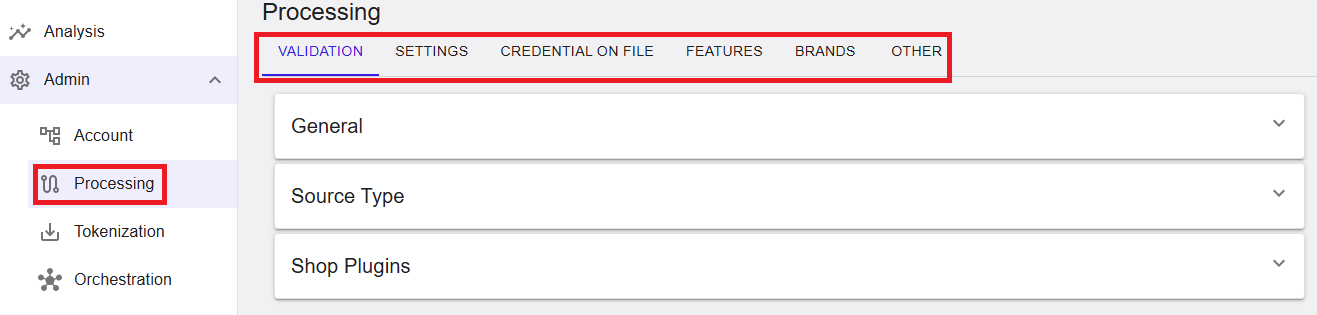
Where to find this screen
- In the left navigation menu, select Admin.
- Select Processing.
Processing Tabs (Top of the page)
The tabs at the top allow you to switch between different processing configuration areas:
- VALIDATION – Validation-related configuration and checks.
- SETTINGS – General processing settings.
- CREDENTIAL ON FILE – Settings related to stored credentials (where applicable).
- FEATURES – Feature enablement and configuration options.
- BRANDS – Brand-related configuration and selection.
- OTHER – Additional processing options that do not fit into other categories.
Expandable Sections (Within the selected tab)
Within the selected tab (shown: VALIDATION), configuration content is grouped into expandable sections. Each section can be expanded to view or update settings (subject to user permissions).
- General – General validation or configuration items.
- Source Type – Source-type related settings (where applicable).
- Shop Plugins – Shop plugin-related settings (where applicable).
Select the arrow on the right side of a section to expand or collapse it.
Summary
The Processing area provides structured access to processing configuration through a tabbed layout and expandable sections. Use the tabs to navigate between configuration categories and expand sections to view or maintain settings, depending on your assigned permissions.