
Processing – Credential on File (CoF)
The Credential on File tab is used to review and manage configuration related to stored credentials and credential‑on‑file processing. This includes settings that impact CIT (Customer‑Initiated Transactions) and MIT (Merchant‑Initiated Transactions), as well as behavior for grandfathering where applicable.
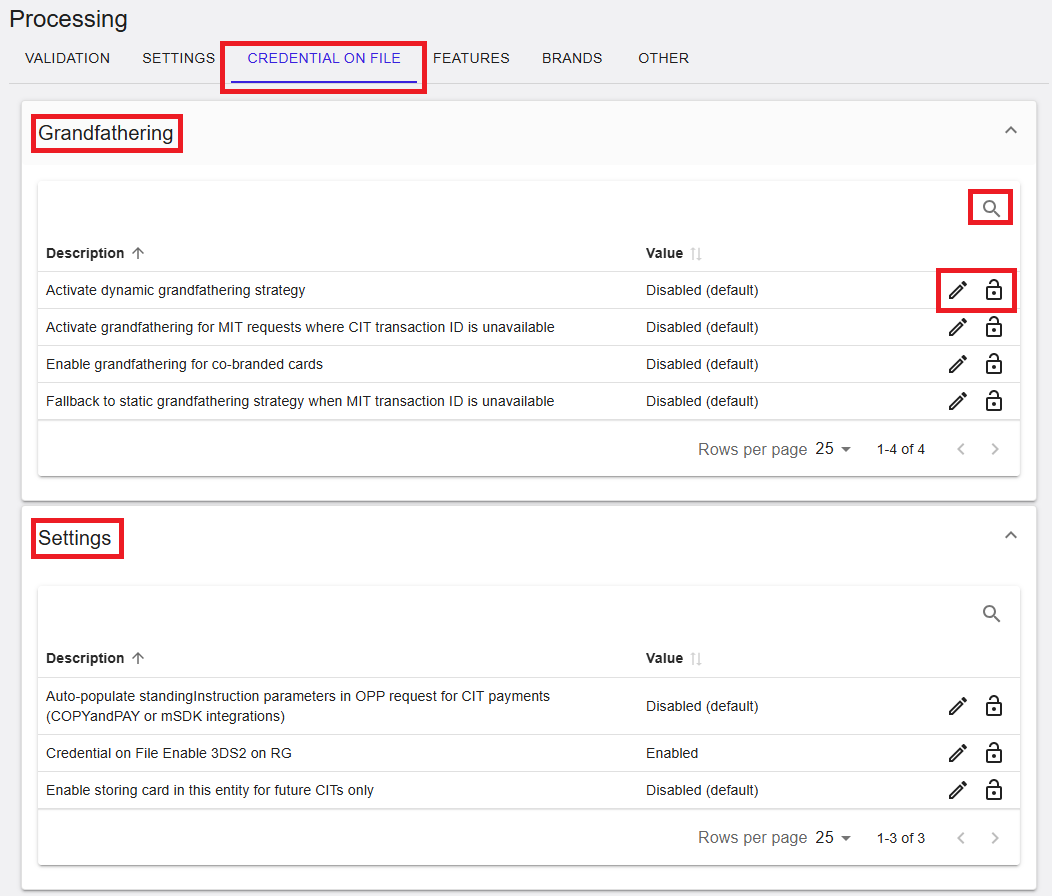
Figure 1: Processing – Credential on File
Where to find this screen
- In the left navigation menu, select Admin.
- Select Processing.
- Select the CREDENTIAL ON FILE tab.
Credential on File Sections
Within the CREDENTIAL ON FILE tab, configuration is grouped into expandable sections. In this view, the following sections are shown:
- Grandfathering – Options related to grandfathering strategies used in Credential‑on‑File scenarios.
- Settings – Additional Credential on File configuration options.
Select the arrow on the right side of a section to expand or collapse it.
Grandfathering
The Grandfathering section lists options that influence grandfathering behavior. Each entry is displayed as a row with:
- Description – The setting name and purpose.
- Value – The current configuration value (for example, Disabled (default)).
- Actions – Icons for managing the entry (availability depends on permissions).
Examples of settings shown in this section include:
- Activate dynamic grandfathering strategy
- Activate grandfathering for MIT requests where CIT transaction ID is unavailable
- Enable grandfathering for co‑branded cards
- Fallback to static grandfathering strategy when MIT transaction ID is unavailable
A Search icon may be available to locate settings quickly. Depending on permissions, edit or lock icons may be shown.
Grandfathering (RiRo Settings)
| Name | Description | Value |
|---|---|---|
| Activate dynamic grandfathering strategy | Applies a dynamic grandfathering strategy for Credential on File transactions. When enabled, eligibility is determined based on transaction history and scheme rules. | Enabled / Disabled / Inherited |
| Activate grandfathering for MIT requests where CIT transaction ID is unavailable | Applies grandfathering to Merchant‑Initiated Transactions when the original CIT transaction identifier cannot be provided. | Enabled / Disabled / Inherited |
| Enable grandfathering for co‑branded cards | Applies the grandfathering exemption to eligible co‑branded card transactions. | Enabled / Disabled / Inherited |
| Fallback to static grandfathering strategy when MIT transaction ID is unavailable | Falls back to a static grandfathering strategy when dynamic criteria cannot be evaluated due to missing MIT transaction identifiers. | Enabled / Disabled / Inherited |
Settings
The Settings section contains additional Credential on File configuration options. Each entry is displayed as a row with:
- Description – The setting name and purpose.
- Value – The current configuration value (for example, Enabled or Disabled (default)).
- Actions – Icons for managing the entry (availability depends on permissions).
Examples of settings shown in this section include:
- Auto‑populate standingInstruction parameters in OPP request for CIT payments
- Credential on File Enable 3DS2 on RG
- Enable storing card in this entity for future CITs only
A Search icon may be available to locate settings quickly. Depending on permissions, edit or lock icons may be shown.
Credential on File Settings (RiRo)
| Name | Description | Value |
|---|---|---|
| Auto‑populate standingInstruction parameters in OPP request for CIT payments | Automatically populates standingInstruction parameters in OPP requests for Cardholder‑Initiated Transactions when using COPYandPAY or mSDK integrations. | Enabled / Disabled / Inherited |
| Credential on File Enable 3DS2 on RG | Triggers 3D Secure 2 authentication during Credential on File registration (RG) transactions. | Enabled / Disabled / Inherited |
| Enable storing card in this entity for future CITs only | Restricts stored credentials on this entity to Cardholder‑Initiated Transactions only. When enabled, stored cards cannot be used for Merchant‑Initiated Transactions. | Enabled / Disabled / Inherited |
Summary
The Processing → Credential on File tab provides centralized access to credential‑on‑file configuration, including grandfathering strategies and additional settings that influence CIT and MIT processing behavior. Visibility and editability of settings depend on the selected hierarchy level and assigned user permissions.