
Processing – Other
The Other tab contains additional processing-related configuration that does not fit into the main processing categories. These settings typically cover operational, reporting, notification, and chargeback-related behavior.
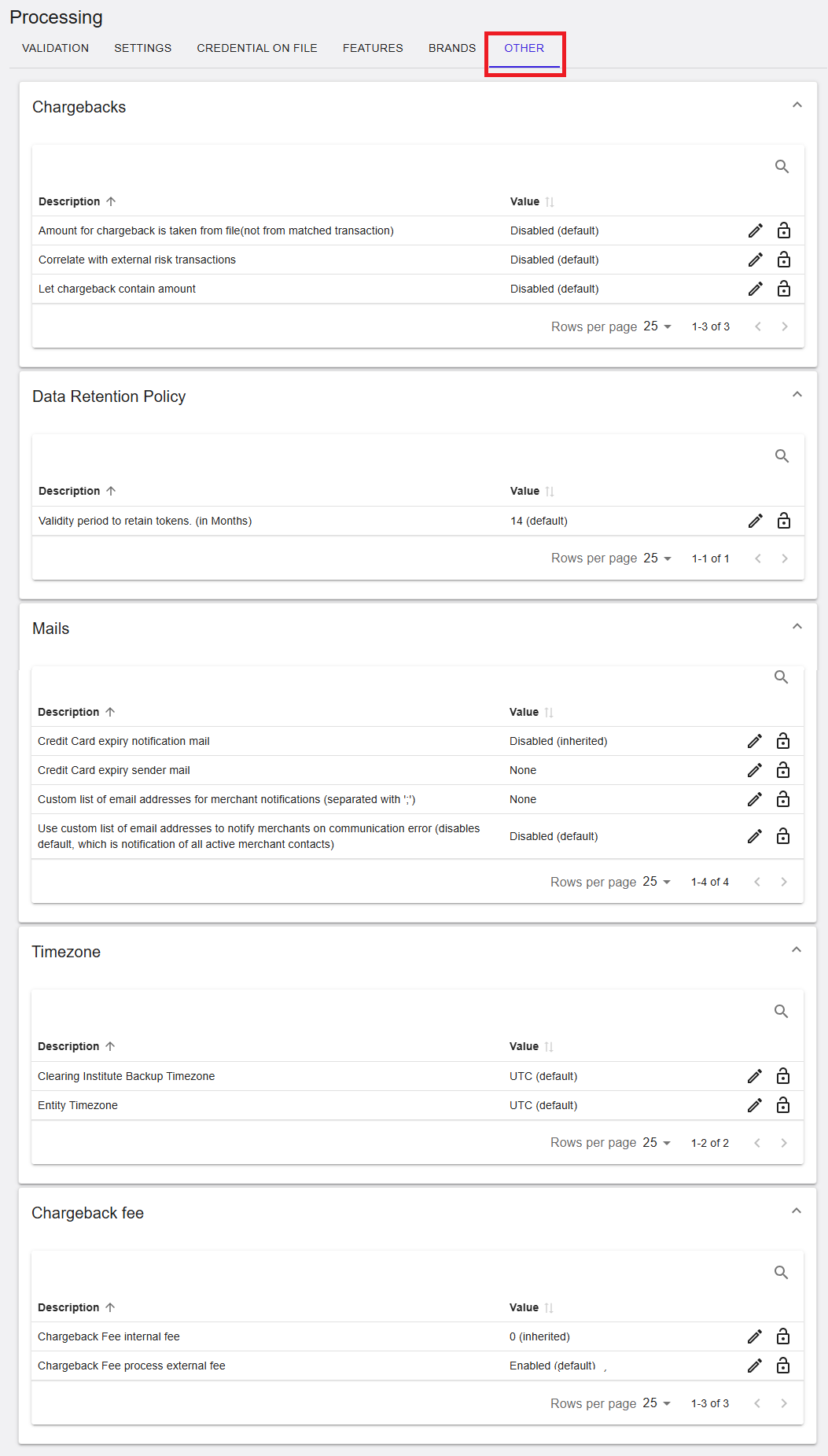
Figure 1: Processing – Other tab
Where to find this screen
- In the left navigation menu, select Admin.
- Select Processing.
- Select the OTHER tab.
Other Sections (Expandable Panels)
The OTHER tab is organized into expandable sections. Each section groups related settings. Select the arrow on the right side of a section to expand or collapse it.
Sections shown include:
- Chargebacks
- Data Retention Policy
- Mails
- Timezone
- Chargeback Fee
Chargebacks
The Chargebacks section contains settings that influence how chargeback information is handled and correlated.
- Amount for chargeback is taken from file – Controls whether the amount is taken from the chargeback file instead of the matched transaction.
- Correlate with external risk transactions – Enables correlation with external risk data.
- Let chargeback contain amount – Allows chargeback records to include an amount.
Each setting displays its current value (for example, Disabled (default)) and may provide edit or lock icons depending on permissions.
Chargebacks (RiRo)
| Name | Description | Value |
|---|---|---|
| Amount for chargeback is taken from file (not from matched transaction) | Uses the amount provided in the incoming chargeback file instead of the amount from the matched original transaction. | Enabled / Disabled / Inherited |
| Correlate with external risk transactions | Correlates incoming chargebacks with externally sourced risk transactions to enrich chargeback records. | Enabled / Disabled / Inherited |
| Let chargeback contain amount | Allows a chargeback transaction to include a disputed amount value. | Enabled / Disabled / Inherited |
Data Retention Policy
The Data Retention Policy section defines how long certain data elements are retained.
- Validity period to retain tokens (in months) – Defines how long stored tokens are retained before expiration.
The value is shown in months (example: 14 (default)).
Data Retention Policy (RiRo)
| Name | Description | Value |
|---|---|---|
| Validity period to retain tokens (in months) | Defines the number of months that tokenised payment credentials are retained before being automatically purged. | Configured value |
Mails
The Mails section controls email notifications related to merchant and card lifecycle events.
- Credit card expiry notification mail – Enables or disables expiry notifications.
- Credit card expiry sender mail – Defines the sender email address.
- Custom list of email addresses for merchant notifications – Allows specifying recipients explicitly.
- Use custom list of email addresses – Controls whether custom recipients are used instead of default merchant contacts.
Some values may be inherited or disabled by default, depending on scope.
Mails (RiRo)
| Name | Description | Value |
|---|---|---|
| Credit Card expiry notification mail | Sends an automated notification when a stored card is approaching expiry. | Enabled / Disabled / Inherited |
| Credit Card expiry sender mail | Sender email address used for expiry notification emails. | Configured value |
| Custom list of email addresses for merchant notifications | Defines a semicolon-separated list of email addresses to receive merchant notifications. | Configured list |
| Use custom list of email addresses to notify merchants on communication error | Uses the custom email list instead of default merchant contacts for communication errors. | Enabled / Disabled / Inherited |
Timezone
The Timezone section defines time-related configuration used for processing and reporting.
- Clearing Institute Backup Timezone – Fallback timezone used by the clearing institute.
- Entity Timezone – The primary timezone associated with the entity.
Values are typically displayed as UTC (default).
Timezone (RiRo)
| Name | Description | Value |
|---|---|---|
| Clearing Institute Backup Timezone | Backup timezone used if the primary timezone configuration is unavailable. | Configured value |
| Entity Timezone | Timezone applied to the entity for processing and reporting. | Configured value |
Chargeback Fee
The Chargeback Fee section controls how chargeback-related fees are applied.
- Chargeback Fee internal fee – Defines an internal chargeback fee value.
- Chargeback Fee process external fee – Controls whether external chargeback fees are applied.
Values may be enabled, disabled, or inherited, depending on configuration and scope.
Chargeback Fee (RiRo)
| Name | Description | Value |
|---|---|---|
| Chargeback Fee internal fee | Internal fee amount applied when a chargeback is processed. | Configured value |
| Chargeback Fee process external fee | Applies external chargeback fees received from acquirers or schemes. | Enabled / Disabled / Inherited |
| Chargeback Fee process internal fee | Applies the configured internal chargeback fee during chargeback processing. | Enabled / Disabled / Inherited |
Summary
The Processing → Other tab provides access to additional processing configuration, including chargeback handling, data retention, notification emails, timezone settings, and chargeback fee behavior. Editability and visibility of settings depend on your assigned permissions and the selected hierarchy level.